Map 4 Me v1.3.0
Map 4 Me displays locations from any WordPress post type, ACF field, Directory 4 Me listing, or Event 4 Me venue on fast, clustered maps. Maps initialize only when scrolled into view so off-screen maps request zero tiles.
- Bundled Leaflet 1.9.4 + OpenStreetMap (or any custom XYZ tile server) with zero API keys
- Automatic marker clustering with rich photo, rating, and link popups
- Lazy-loads on scroll (or click-to-load for strict privacy), zero tile requests above the fold
- Works with any custom post type, ACF Google Map fields, lat/lng meta, or pasted Google/Apple Maps links
- Editor map picker + 30-day cached Nominatim address search with rate limiting
Screenshots
See Map 4 Me in action
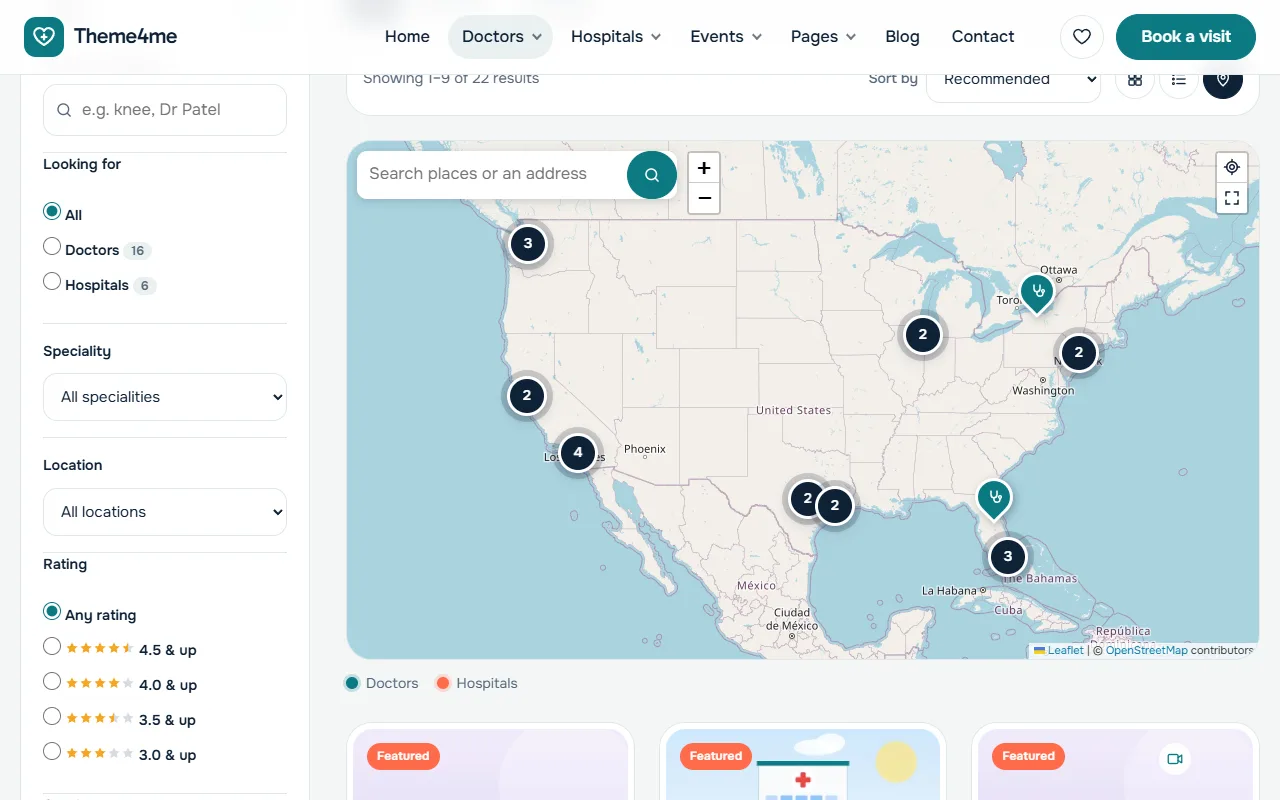
A map of listings with clusters, free with OpenStreetMap.
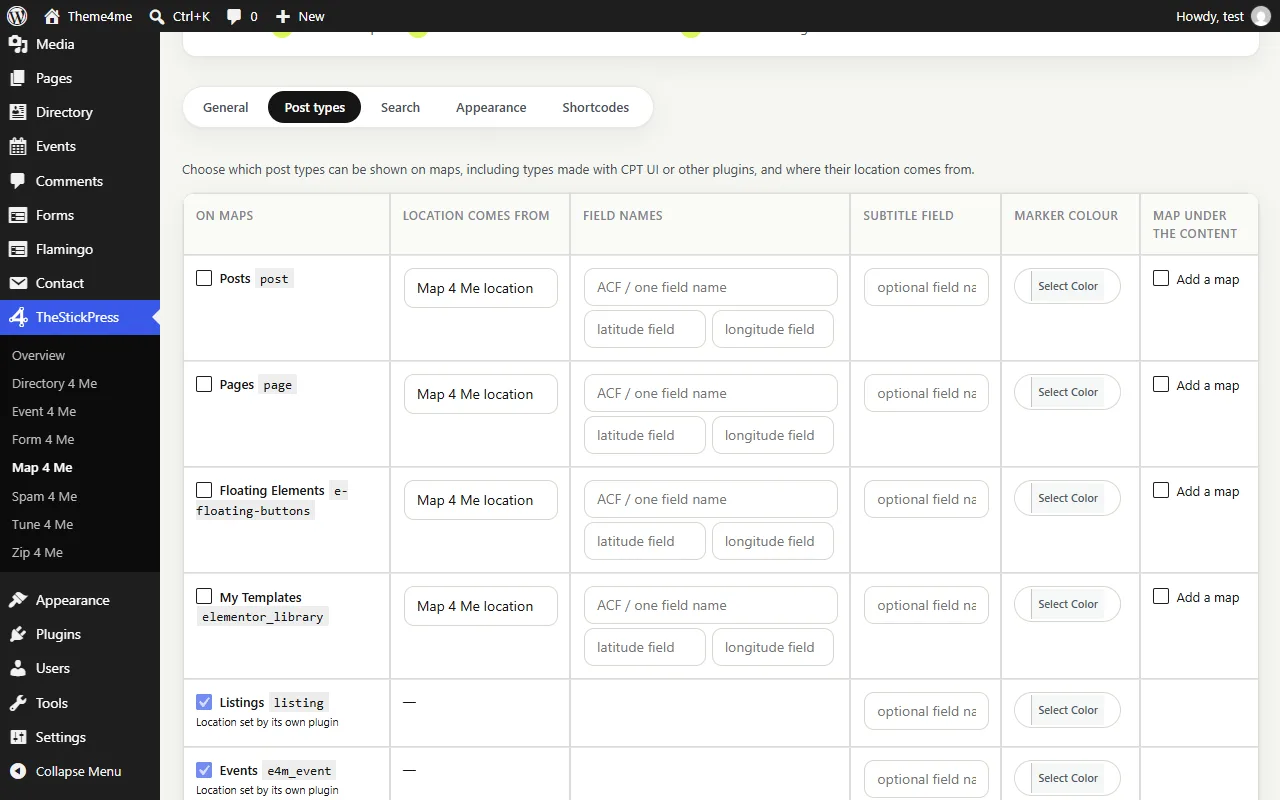
Choose which content can be on maps and where its location comes from.
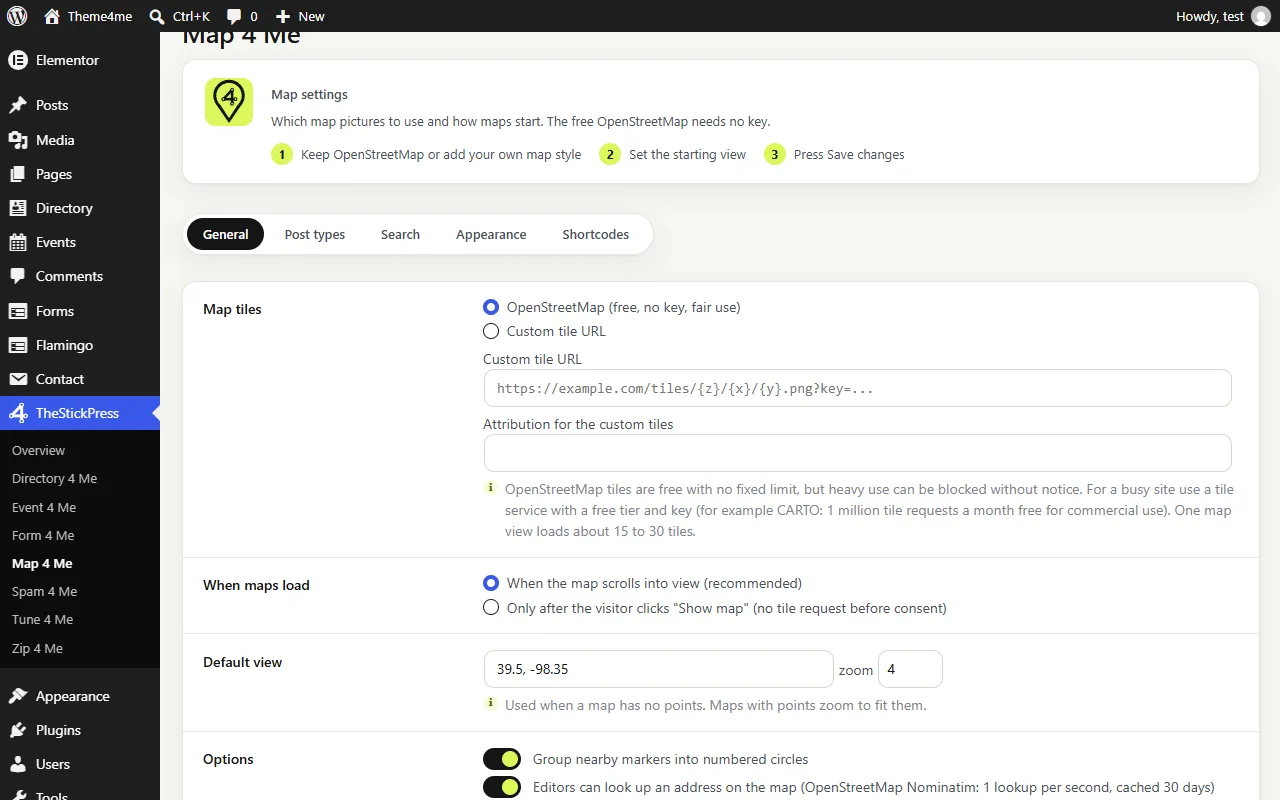
Map settings: map pictures, starting view and when maps load.
Features
Key Features of Map 4 Me
100% Free, No API Key Required
Uses bundled Leaflet 1.9.4 and OpenStreetMap tiles out of the box, or plug in your own Mapbox/Stadia/custom XYZ tile template.
Universal Post Type & ACF Support
Turn any CPT UI post type into map pins using the Map 4 Me location box, ACF Google Map field, or custom lat/lng meta fields.
Smart Google/Apple Maps Link Parser
Editors can simply paste a Google Maps (including maps.app.goo.gl short links), Apple Maps, or OpenStreetMap URL to set coordinates.
Viewport Lazy Loading
Maps build only when scrolled into the viewport (or on visitor click), keeping initial page weight and network requests minimal.
Browser-First Place Search
Visitors search map pins instantly in the browser for free, falling back to cached, rate-limited Nominatim geocoding only when needed.
Shortcode Generator & Elementor Widget
Build custom map shortcodes visually or drag the Map 4 Me widget directly into any Elementor layout.
How to Install Map 4 Me
- Click Download map4me.zip (130.4 KB) above to save the release archive.
- In your WordPress admin dashboard, open Plugins > Add New > Upload Plugin.
- Select
map4me.zip, click Install Now, and Activate. - Open TheStickPress > Map 4 Me in the admin menu to configure settings.
Changelog
- 1.3.0: Refreshed admin dashboard design, intro step cards, and unsaved changes bar.
- 1.2.0: Added "user" and "building" marker icons and universal theme box-sizing.
- 1.1.0: Shared TheStickPress admin hub.
Updates
Keep Map 4 Me up to date
Update in four steps
- Download the latest ZIP from this page. The current version is 1.3.0.
- In WordPress open Plugins > Add New > Upload Plugin.
- Choose the ZIP and click Install Now.
- Choose "Replace current with uploaded". Your settings and content are kept.
What changed?
The changelog above lists every release. Back up before major updates, and test on a copy of your site if it is busy.
- Zip 4 Me makes a one click backup first
- Automatic updates are planned
Support
Request support for Map 4 Me
Tell us what you need and we will reply as soon as possible.
Works well with
Pair it with
Directory 4 Me
Listings, reviews and booking buttons.
Event 4 Me
Calendar, sessions and registration.
Form 4 Me
Contact, booking and paid forms.
FAQ
Frequently Asked Questions
Do I need a Google Cloud billing account or API key?
No. Map 4 Me uses OpenStreetMap and Nominatim with strict caching and rate limits, so it is 100% free to run.
Can I delay map tile loading until a visitor clicks?
Yes. In TheStickPress > Map 4 Me > General, set "When maps load" to "After a click" for strict privacy compliance.